








iGPSPORT BiNavi Ultra vs BiNavi vs Air: Which Suits Oman?

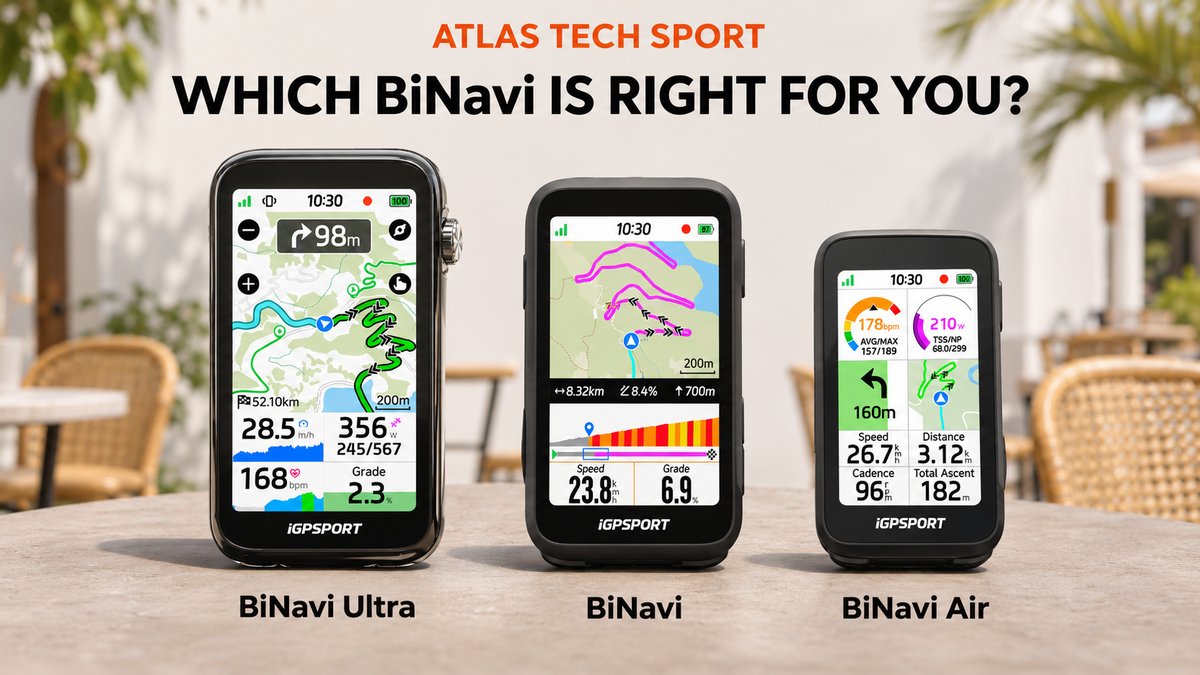
Choosing between iGPSPORT BiNavi Ultra vs BiNavi vs BiNavi Air is about more than buying the newest model. The three computers take different approaches to screen size, weight, controls and navigation.
For cycling in Muscat and across Oman, start with the information you need during a ride. Do you spend most of the time following unfamiliar roads, watching a training page or simply recording a familiar morning loop? This comparison explains the differences that can affect that choice.
Specifications checked against iGPSPORT’s official product pages on 15 November 2026. This is a specification-based comparison, not a hands-on test. Firmware can change available functions.
BiNavi Ultra vs BiNavi vs BiNavi Air: Key Specifications
| Feature | BiNavi Ultra | BiNavi | BiNavi Air |
|---|---|---|---|
| Colour touchscreen | 3.7 inches | 3.5 inches | 3.0 inches |
| Resolution | 480 × 854 | 320 × 480 | 240 × 400 |
| Dimensions | 108.2 × 60.9 × 14.3 mm | 101 × 60 × 14.5 mm | 91.2 × 51.3 × 13.8 mm* |
| Weight | 122 g | 103 g | 77 g |
| Physical controls | 3 buttons + rotary dial | 6 buttons | 6 buttons |
| Storage | 64 GB | 32 GB | 32 GB |
| Battery capacity | 2,420 mAh | 1,250 mAh | 1,020 mAh |
| Published endurance** | 30+ hours | 35+ hours | 30+ hours |
| Charging | USB-C; approximately 1.5 hours | USB-C; approximately 1.5 hours | USB-C; approximately 1.5 hours |
| Wireless connections | Wi-Fi, Bluetooth, ANT+ | Bluetooth, ANT+ | Bluetooth, ANT+ |
| Satellite positioning | Multi-GNSS, dual-band L1/L5 | Multi-GNSS, dual-band L1/L5 | Multi-GNSS, dual-band L1/L5 |
| Water-resistance rating | IPX7 | IPX7 | IPX7 |
*Air dimensions exclude the fixed base. **These are manufacturer specification-table figures, not results from a controlled comparison. The same pages also use “up to 35 hours” for BiNavi and “up to 30 hours” for Air. Treat them as approximate planning figures. Sources: Ultra, BiNavi and Air.
What Does BiNavi Ultra Add?
Ultra’s distinctive additions include route collections, automatic climb detection through iClimb 4.0, inertial navigation and local MP3/WAV playback. Route collections group multiple courses; inertial navigation uses an IMU and dead-reckoning algorithm to support tracking during weakened satellite reception. iGPSPORT also documents custom navigation widgets. Official Ultra feature details.
Think About Your Route Before Upgrading
For a planned multi-day trip, ask whether you regularly manage several separate courses. For spontaneous riding, ask whether you want climb information without committing to a saved route. Those are more useful questions than simply counting features.
Inertial assistance should not be interpreted as a promise of perfect positioning in every tunnel or valley. Carry a backup route and a phone when exploring unfamiliar areas. Map availability also does not establish whether a road is open, suitable for bicycles or appropriate for your ability.
Screen and Controls: Compare Your Actual Riding View
The display figures favour Ultra for a rider who wants more screen space. Air takes the opposite approach: a smaller footprint on the handlebar. Standard BiNavi sits between them.
Our practical recommendation is to compare a map with the exact data fields you expect to use. A page containing power, heart rate, cadence, distance and a map can feel very different from a page with just three large numbers.
Do not judge outdoor readability from an indoor photograph. Check your normal riding angle, glasses and preferred brightness. Before buying a mount, check computer clearance, cable routing and space for a light. Stop before exploring menus or changing a complicated setting.
Navigation: All Three Go Beyond Basic Ride Recording
All three list maps, offline back-on-track navigation and climb planning. Ultra adds the route-collection and automatic-climb functions described above; the standard and Air tables mark those additions as unavailable.
There is an important wording distinction in the official tables: BiNavi and Air list “Turning tips” while a separate “Turn-by-Turn Navigation” row is marked unavailable. Their marketing also describes course guidance. Therefore, do not interpret those table entries as meaning that the smaller models offer no directions, or assume their guidance is identical to Ultra’s.
Before a longer ride in Oman, load the relevant map and route, then practise leaving and rejoining a short familiar course. That is a more useful preparation than discovering the rerouting behaviour during an unfamiliar ride.
For the transfer workflow, use our separate iGPSPORT App GPX import and BiNavi route guide.
Battery Life: Why the Largest Battery Is Not the Longest Rating
Standard BiNavi has the highest published endurance in this group, despite Ultra’s larger battery capacity. Capacity alone does not determine runtime: the complete device and operating conditions matter.
For an endurance event, compare your planned recording time with a comfortable reserve. Test your own navigation, brightness and accessory setup before relying on a specification. Start with a full charge and decide in advance how you will handle a longer-than-planned day.
For everyday Muscat training, charging convenience may matter more than the difference between headline figures. Keep the charging connection dry and follow the instructions supplied with the device.
Sensors and Training: Match the Accessory, Not Just the Brand
Each model lists heart-rate, speed, cadence and power-sensor support, radar, smart lights and trainer control. Standard BiNavi’s table specifically lists ANT+ for power meters; Ultra explicitly lists Bluetooth and ANT+. Air lists power-meter support without specifying the protocol in that row.
If you own a Bluetooth-only power meter, verify that exact combination before choosing Air. Do the same for a trainer, radar or electronic shifting system: sharing a wireless standard does not guarantee every advanced function.
Write down the accessories you already own and the data you actually need. An upgrade is worthwhile when it fixes a limitation in your setup, rather than adding functions that stay unused.
Which BiNavi Should You Choose in Oman?
| Your priority | Our suggested starting point | Trade-off to consider |
|---|---|---|
| Frequent exploration and a map-focused cockpit | BiNavi Ultra | Larger, heavier device; ask whether the additional tools will be used |
| A middle-sized screen for regular training and planned rides | BiNavi | Fewer of Ultra’s navigation additions |
| A compact cockpit and low device weight | BiNavi Air | Less screen space for maps and dense pages |
| You already own a BiNavi that meets your needs | Keep it unless you can name a specific limitation | Newer features do not automatically improve familiar rides |
These are Atlas Tech Sport’s editorial recommendations, not test rankings. Compare current product details and package contents before purchasing. A compatible mount or sensor shown in an illustration is not automatically included.
Frequently Asked Questions
Is BiNavi Ultra always the best choice?
It is the strongest starting point for this comparison’s navigation-focused rider. Choose according to your cockpit, route habits and accessory requirements rather than treating the flagship label as a universal answer.
Should I upgrade from BiNavi to Ultra?
Identify the specific improvement you want first. If your current screen and route workflow already work well, there may be little urgency to change.
Can I use these computers without a phone on the handlebar?
You can follow a prepared offline route without mounting a phone beside the computer. Complete setup and transfers before departure; phone-dependent connected services are a separate matter.
Which one should I compare for a long-distance ride?
Look at route management, screen layout and your own runtime test together. Select a device with reserve for delays and detours, rather than planning to exhaust a headline battery figure.
Compare BiNavi Computers at Atlas Tech Sport
Explore BiNavi Ultra, BiNavi and BiNavi Air, or browse our iGPSPORT bike computers. Contact Atlas Tech Sport in Muscat with your existing sensor models and riding priorities to compare suitable options.
Cover: AI-generated editorial illustration based on official iGPSPORT product references. Device placement and relative scale are illustrative; screen examples do not represent a verified route in Oman.