







iGPSPORT vs Garmin Bike Computers: Which Should You Choose in Oman?

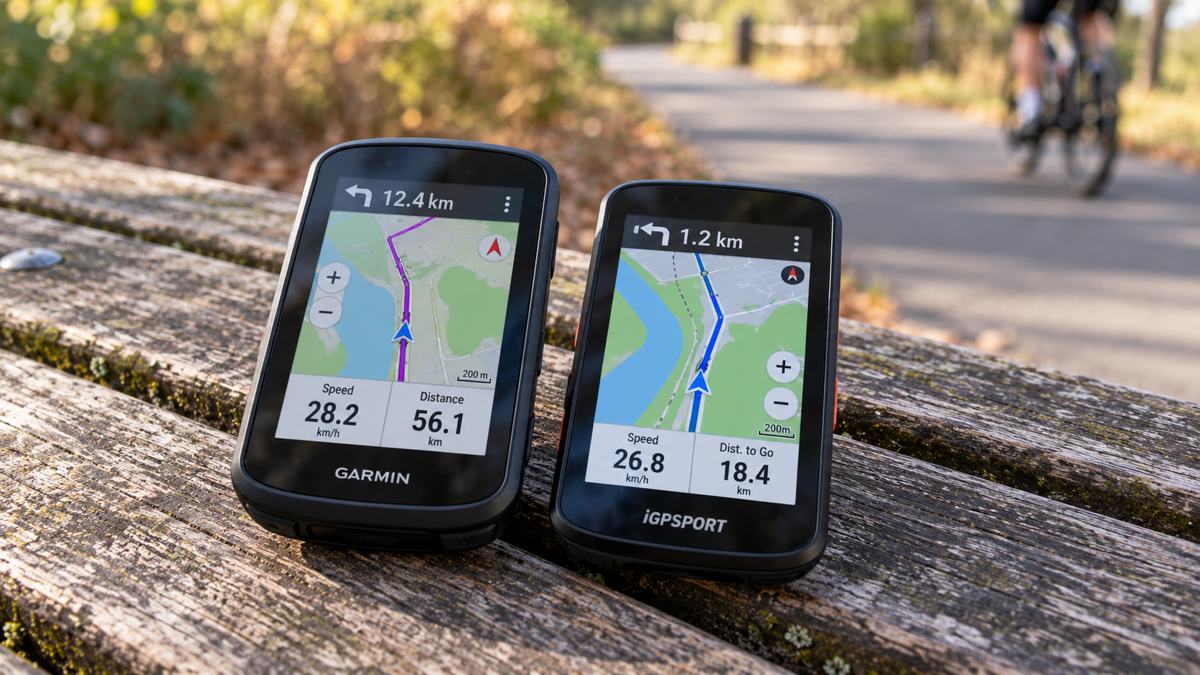
A GPS cycling computer should make your ride easier to follow. You may want clear navigation for unfamiliar roads, power targets for structured training or a convenient way to view your ride data without reaching for a phone.
Both iGPSPORT and Garmin offer devices that go beyond recording speed and distance. The useful question is which model fits your riding routine.
This guide compares two compact navigation-focused options: the iGPSPORT BiNavi AIR and Garmin Edge 850. Their differences provide a practical starting point for cyclists in Muscat and across Oman.
Start With What You Need During a Ride
Before comparing specifications, identify the information you actually use.
For regular fitness rides, you might mainly need speed, distance, heart rate and a route screen. For performance training, workout prompts and power data may matter more. For longer outings, navigation and battery reserve become important.
Make a short list of essentials. A feature is valuable when it improves your riding or planning—not simply because it appears on a specification sheet.
BiNavi AIR and Edge 850: Key Differences
| Feature | iGPSPORT BiNavi AIR | Garmin Edge 850 |
|---|---|---|
| Display | 3-inch colour display with automatic brightness | 2.7-inch colour touchscreen |
| Published battery endurance | Up to 30 hours; conditions affect results | Up to 12 hours; up to 36 hours in battery saver mode |
| Navigation highlights | Offline maps, off-course recalculation and custom navigation widgets | Touchscreen map control and on-device course creation |
| Climbing tools | iClimb 3.0 | ClimbPro |
| Training highlights | Workout training, route simulation and FTP ramp testing with a compatible smart trainer | Adaptive Garmin Cycling Coach plans through Garmin Connect |
| Distinctive feature | Published weight of 77 grams | Built-in speaker for navigation prompts and a digital bike bell |
These are manufacturer specifications, not results from a head-to-head test. Battery figures use different conditions and should not be treated as directly equivalent. See the official BiNavi AIR specifications and Garmin’s Edge 850 feature overview.
Navigation: Compare the Complete Workflow
Navigation is more than displaying a map. Consider how you create a route, transfer it, follow turns and recover after leaving the course.
iGPSPORT BiNavi AIR
BiNavi AIR offers global offline maps and off-course recalculation. Routes can be planned in the app and transferred to the device.
Its navigation widgets let you combine maps, turn instructions and selected ride metrics. This could suit cyclists who want navigation and key data visible together. Voice prompts require a connection to the iGPSPORT app.
Garmin Edge 850
Edge 850 combines touchscreen and button controls. Garmin highlights on-device course creation, allowing riders to build a route point by point using the touchscreen. Its built-in speaker provides audible navigation and workout prompts.
For either device, verify map coverage for your intended routes in Oman. Download the necessary maps and courses before leaving reliable internet coverage.
Displays: Size Is Only Part of the Decision
BiNavi AIR has the larger display in this comparison, but diagonal size alone does not determine readability.
The important test is whether you can recognise the information you need while the computer is mounted at a normal viewing distance.
- Map detail and turn instructions.
- Font size on your preferred data page.
- Visibility in bright daylight.
- Readability during early-morning rides.
- Ease of changing screens.
If possible, examine both outdoors. A display that looks impressive indoors may feel different under direct sunlight.
Battery Life: Avoid Comparing Only the Biggest Number
BiNavi AIR’s advertised maximum is 30 hours. Garmin lists up to 12 hours for Edge 850 and up to 36 hours in battery saver mode. See the Edge 850 owner’s manual.
Those numbers describe different usage assumptions. They do not establish how either device will perform with identical settings.
For a fair purchase decision, consider navigation throughout the ride, display brightness, connected sensors, phone connectivity and frequency of map interaction.
Choose enough endurance for your longest expected ride plus a reserve. Also check what changes when battery saver mode is enabled.
Training: Which System Fits Your Routine?
Garmin’s Coaching Approach
Garmin offers adaptive Cycling Coach plans through Garmin Connect. The company describes plans that account for training, recovery and course demands, with requirements that depend on the particular feature and connected equipment.
This is worth exploring if you want the computer to be part of a broader training-planning system.
iGPSPORT’s Indoor Training Tools
iGPSPORT lists workout training, route simulation and an FTP ramp test for BiNavi AIR when connected to a compatible smart trainer.
These functions may appeal to riders combining outdoor cycling with indoor sessions.
Before choosing either system, verify your complete workflow: creating or receiving a workout, sending it to the device and reviewing the completed session.
Climbing: iClimb or ClimbPro?
BiNavi AIR’s iClimb 3.0 provides climb previews, while Garmin’s ClimbPro displays information such as gradient, ascent and remaining distance on supported devices.
For riders tackling climbing routes, these tools can help make the upcoming effort easier to understand.
Compare the actual screens. Ask whether climb information remains readable alongside the data you normally use, and check how each device identifies climbs on your intended route.
Sensors and Accessories: Check Exact Compatibility
A cycling computer becomes more useful when it works with your existing equipment.
Before buying, confirm compatibility with heart-rate monitors, speed and cadence sensors, power meters, smart trainers, radar taillights and electronic shifting systems, if used.
BiNavi AIR supports standard Bluetooth or ANT+ devices. Garmin confirms Edge 850 compatibility with Varia radar and camera products. However, wireless connectivity alone does not guarantee every accessory feature works across brands.
Check the exact accessory and function you need rather than assuming compatibility from the brand name.
Choosing for Cycling in Muscat and Oman
Your local riding routine makes a useful comparison test.
For early-morning rides, examine low-light readability and straightforward controls. For longer daytime outings, focus on screen visibility, navigation and battery reserve.
Follow the manufacturer’s temperature and charging guidance. Avoid leaving the device inside a parked vehicle, and keep charging connections clean and dry.
The mount also matters. Check that the device fits your cockpit securely and remains easy to view alongside lights or other equipment.
Which Should You Choose?
Put BiNavi AIR on Your Shortlist If:
- Its 3-inch display suits your preferred map and data layout.
- You value a lightweight device.
- Its navigation widgets match how you ride.
- Its published endurance meets your needs.
- You want to explore its compatible indoor-training functions.
Put Edge 850 on Your Shortlist If:
- You want Garmin Connect’s coaching workflow.
- Touchscreen map interaction is a priority.
- On-device route creation would be useful.
- Built-in audible prompts appeal to you.
- You already use compatible Garmin cycling accessories.
Neither device is the automatic winner for every cyclist. Choose the one that makes your routes, workouts and everyday controls easier to manage.
Contact Atlas Tech Sport to compare suitable cycling computers for your riding routine in Muscat and across Oman.
Frequently Asked Questions
Is iGPSPORT only for beginners?
No. BiNavi AIR includes navigation, climb information, sensor connectivity and compatible indoor-training functions. Suitability depends on your requirements.
Does Garmin always have better battery life?
No brand-wide assumption is reliable. Compare exact models, operating modes and the manufacturer’s test conditions.
Can I use third-party sensors?
Check the exact computer, sensor and required function. ANT+ or Bluetooth support is a starting point, not a guarantee of complete compatibility.
Can a cycling computer replace my phone?
It can handle ride data and navigation, but some connected functions require a phone or app. Keep separate communication arrangements for longer or remote rides.
Should I choose based on screen size?
Use screen size as one factor. Readability, controls, navigation and battery performance also matter.
Which is better for cycling in Oman?
The better choice depends on your routes, training tools and accessories. Test the display outdoors and verify map coverage before deciding.